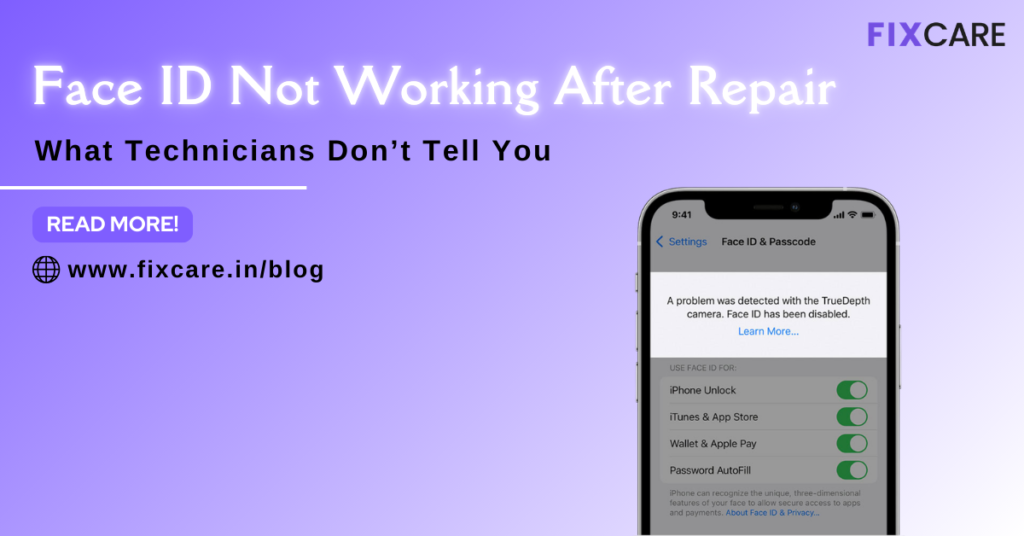
Face ID Not Working After Repair — What Technicians Don’t Tell You
Table of Contents
If you recently repaired your iPhone and now your Face ID not working after repair, you’re not alone. This is one of the most common and frustrating problems faced by iPhone users after screen replacement, camera repair, battery change, or water damage service. Many users are shocked to discover that Face ID suddenly stops functioning, even though their phone appears perfectly fine.
In this blog, we will explain why Face ID not working after repair, uncover the hidden technical reasons most technicians don’t explain, and provide practical solutions that actually work. We’ll also guide you on when to seek professional help from Fixcare iPhone Repair in Bangalore for expert diagnostics and safe repairs.
What Is Face ID and How Does It Work?
Face ID is Apple’s advanced biometric security system that uses infrared cameras, dot projectors, flood illuminators, and sensors to map your facial structure. These components work together as a single calibrated system. Even slight damage or misalignment can cause Face ID failure.
This means Face ID is not just software-based — it is deeply dependent on precise hardware alignment. Any improper handling during repair can lead to Face ID not working after repair.
Why Face ID Not Working After Repair Is So Common
Unlike Touch ID, Face ID relies on multiple sensitive components placed near the top of the display. During repairs, especially screen replacements, even minimal mishandling can damage connectors or disturb sensor calibration.
Many third-party repairs fail to preserve the original Face ID sensor assembly, leading to permanent Face ID failure.
12 Hidden Reasons Why Face ID Not Working After Repair
1. Damaged Dot Projector
The dot projector projects over 30,000 infrared dots onto your face to create a depth map. If this component is damaged during repair, Face ID not working after repair becomes permanent.
2. Flood Illuminator Failure
This infrared light helps Face ID operate in low-light conditions. If damaged, Face ID may stop working entirely.
3. Misaligned Front Camera Module
Improper alignment of the TrueDepth camera assembly during reassembly disrupts calibration and disables Face ID.
4. Damaged Flex Cable
Flex cables are extremely delicate. Even slight tearing, folding, or stretching during repair can result in Face ID malfunction.
5. Poor Quality Screen Replacement
Low-quality aftermarket screens often lack proper sensor compatibility, leading to Face ID not working after repair.
6. Sensor Contamination
Dust, adhesive residue, or fingerprints inside the sensor housing can interfere with infrared scanning.
7. Water Damage Residue
Even after drying, corrosion from moisture exposure can slowly degrade Face ID components.
8. Connector Pin Damage
Bent or broken connector pins on the logic board interrupt communication between Face ID sensors and the motherboard.
9. Battery Replacement Interference
Improper battery installation may press against Face ID components, disturbing sensor alignment.
10. Logic Board Micro Damage
Minor cracks or trace damage on the motherboard can disable Face ID data transmission.
11. Software Calibration Loss
Improper reboot procedures or corrupted firmware updates during repair may disrupt Face ID calibration data.
12. Unauthorized Part Replacement
Replacing Face ID components without Apple-certified pairing permanently disables Face ID functionality.

How to Check If Face ID Hardware Is Damaged
If your Face ID not working after repair, observe these symptoms:
- “Face ID is not available” error message
- Face ID setup fails repeatedly
- Face ID stops midway during setup
- Front camera works but Face ID fails
These signs strongly indicate hardware-level issues.
Can Software Fix Face ID Not Working After Repair?
In most cases, no. Face ID failures after repair are usually hardware-related. However, you can still try:
- Restarting the device
- Updating iOS
- Resetting Face ID settings
- Resetting all settings
If Face ID still doesn’t work, professional inspection is required.
Final Thoughts
If your Face ID not working after repair, don’t panic — but don’t ignore it either. Face ID is a sensitive biometric system that requires expert handling. While some cases are permanently damaged, many can still be repaired with professional micro-repair techniques.
For safe, reliable, and expert Face ID restoration, trust Fixcare iPhone Repair in Bangalore. Their experienced technicians use advanced tools and precise methods to bring your Face ID back to life.
Recent Blogs


iPhone Keeps Restarting? Here Are 12 Proven Fixes That Actually Work

iPhone Screen Flickering While Charging? Causes and Fixes


Face ID Not Working After Repair — What Technicians Don’t Tell You


Doorstep iPhone repair in HSR: Fast, Reliable & Affordable Service
blog 3
blog post 2
blog post 1


Best Rated iPad Battery Replacement Near Me in bangalore
Get your Device Repaired Today
Recent News

MacBook Pro M5 leaks Point to Next-Level AI Performance

iPhone Keeps Restarting? Here Are 12 Proven Fixes That Actually Work

iPhone Screen Flickering While Charging? Causes and Fixes


Face ID Not Working After Repair — What Technicians Don’t Tell You